Hip Replacement Status Update

The hip is coming along slowly. Imagine, less than two weeks ago, I was on the operating table in Alexandria Hospital, getting my right hip replaced. I spent one night in the hospital. During the time, I took three walks with my new hip, ate Pot Roast and an omelet for breakfast before going home the next day with my brother – in the snow! and was going the next day with my brother – in the snow!

John was nice enough to spend a week taking care of Linda and me. Now, he’s home and we’re on our own. Thankfully Mary Sherman brought some groceries. Star Muir took me to my follow-up appointment with Dr. John Albrigo in Alexandria. Otherwise, it’s been a very quiet week.

Now comes the hard part –physical therapy. I finished in-home and have mastered the basics. That is the purpose of in-home PT – to make sure you can negotiate around your home. For example, Can I get out of bed or up from a chair. Am I able to go up and down the stairs? Although we have (and used it for about a week – didn’t want to over-do it on the first week) a stairlift, I’ve already started using the stairs and an exercising tool. That is the level I’m at right now.

As I recall, it took time to get to the next step. Now it’s building back up the muscles in my right leg. That is the challenge. Both INOVA home PT people (Amy 1 and Amy 2) were once again great. They were the same ladies I had for home PT when I had my left knee replaced. So it was like a reunion of sorts.

Now I start the in-office PT. A big thanks to Dave Feser for picking up at the ungodly (for retired people) 8 AM and giving me a ride to PT evaluation appointment and set up a month of in-office appointments. The evaluation provides a baseline. They’ll take another set at the end to see how much you improve after taking PT. At the end of the first appointment, I got a good laugh. She handed me a set of exercises they wanted me to do at home between appointments. I looked at the sheet – it’s the same exercises I’m already doing thanks to the home PT people.

My goal is to be able to drive sometime next week. However, I’m finding that everything is going slow, from walking, to creating digital paintings, writing and even this journal entry. It’s difficult to get comfortable for any length of time. I find sitting is best, but I have to often to move because of the pain in my hip/butt. I can only lie on my left hip for so long and then I want to turn over, but that is on the operated hip – no thank you. I’ve never slept well on my back.

Because of the holiday and their busy calendar, I only have one PT session next week. I’ll do the exercises at home. I want to be ready for my first session.


Hip Replacement Status

On Monday, January 6, I became the proud new owner of bionic right hip. The surgery was done by Dr. John Albrigo (the same doctor who did my left knee.) I had to stay one night in Inova Alexandria Hospital. Everyone (nurses and PT) there were wonderful. That afternoon and evening, I took two walks around the recovery section – one while I was waiting for my dinner and one after dinner. The food was good.

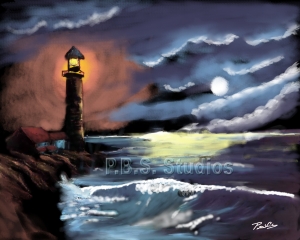
While relaxing in the afternoon and evening, I worked on a digital photo-painting. It a night scene with a lighthouse – inspired by my hero Bob Ross.

The next morning I passed my test with the PT people – walk around the section and then walk up and down a few stairs. So they sent me home. Although the hip joint is very stiff at this point, I have an in-home PT evaluation for this afternoon to start the road to recovery.

A big huge thanks to my older brother, John for coming down this week. He’s been great! He’s cooked all the meals and they have been wonderful and different. Having him here has been a real pleasure. Also, thanks to Gwen Talbert, who lent us necessary bathroom items.


Merry Christmas to All!

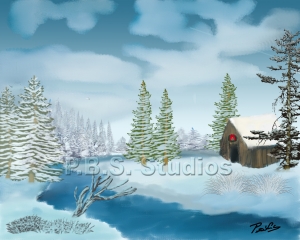
Now that my family has received their holiday card, I can share with my on-line friends my 9th annual holiday digital photo-painting.

A Bob Ross landscape painting inspired this year’s card. Art friend and mentor Laura Lavarnway inspired this tradition. She creates an annual Santa painting as the outside image for her holiday greeting card to her family and friends. I’m still hoping to publish an article on her tradition – any editors want a heart-warming story for next year’s holiday issue, contact me.

Happy Holidays to everyone.   

Adobe Photoshop Digital Photo-Painting Book Production Part 10

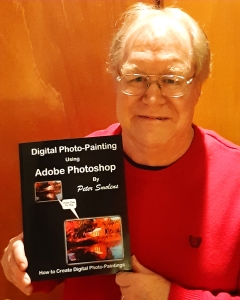
If it wasn’t official before, it is now. This afternoon at 4:30 an Amazon truck delivered a box of my book “Digital Photo-Painting using Adobe Photoshop.” It’s real and in my hands – my first paperback book (see picture.)

Now I can sell books myself when I go to art shows.

 You have to understand why this is a big deal for me. I come from a family of writers. My older brother, John, is a novelist of a dozen novels and a collection of short stories. His latest novel is called “Out” from Michigan State Press (available on Amazon.)

 At the other end of the spectrum is my younger brother Michael – now a columnist for the San Diego Union-Tribune – was the government and politics editor for 25 years.

 Although I’ve published over a hundred articles, digital paintings, and photographs, it’s different being able to say I have published a book, even if it self-published.

 I even wrote an article that was supposed to have been published this fall in an on-line writer’s newsletter. (Note to self – check on the status – was the article published) The column talked about how I got into writing in the first place. I was the photographer of the family. After submitting photographs taken at Bradley Air Museum, I was given the assignment to write an article. I asked John to write the article. Because John mainly writes fiction and he turned down my offer. I wrote the article myself and it became my first published article in ALA Away magazine.

 Now it’s the waiting game to see if people will purchase the book. I hope people will like the book and will write nice reviews on Amazon.


Adobe Photoshop Digital Photo-Painting Book Production Part 8

UPDATE:

Hold on, KDP has a problem with the spine of the cover. They sent an email this morning. It appears they think the lettering and logo on the spine are too large. Here is part of the email:

We checked your files and found issues you need to fix before your book can be published on KDP:

Cover

  • Update the size of your spine text in your cover file. Spine text needs at least 0.0625″ (1.6 mm) on either side so that it doesn’t wrap onto the front or back cover.

Where possible, we give page numbers with examples. To make sure your entire book meets our guidelines, please review your entire manuscript file and fix all issues.

I had to spend the morning making the corrections to the spine and upload the cover again. So we’re still in the review mode. They say it can take up to 72 hours for the review to take place. So we’re in a waiting mode for the moment.

Yesterday, after pressing the publish button and seeing my book “In Review” I thought it’s done! I’m the author of a printed book. It’s on Amazon! Not Quite.

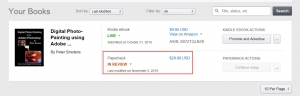
The revised version of the proof book came Monday. I went through with my correction/additions list, and all the changes look good. I did find one addition correction that I was not on my list. It’s not a correction but an addition to the subject of the sentence clearer. So this morning, I uploaded the revised version, and after previewing, I clicked the Publish button. Presto, the printed listing of the book’s status went from Draft to In Review. Well, now it’s done. We’ll see what happens.

Since going live with the e-book last week, much has been happening both personally and professionally. As I said in my last entry, I found out my golf season has ended because of problems with my right leg. I can only stand for a few minutes before the pain in the right hip and knee is too much. I’ll have to live with this until January when I’m having my right hip replaced. The surgery should resolve the problem with the knee, although I will not be surprised if I have to have the right knee replaced down the road.

Friday night, I was part of the MAG artist group displaying our paintings at the Weinegars Sweet and Treats, a bakery, coffee shop, and tearoom in downtown Manassas. Because of the cold night, the traffic was lighter than last year’s walk. It was nice to get out and display my digital photo-paintings to the public. I also had on display the 2020 PBS Studios calendar and the proof copy of the book.

I got some very nice responses to my “Digital Photo-Painting using Adobe Photoshop” book announcement email. Thank you for your support. I appreciate it!


Adobe Photoshop Digital Photo-Painting Book Production Part 6

On Monday, I received my proof copy of my book “Digital Photo-Painting using Adobe Photoshop.” Overall it looks great! Nice shiny cover, full-color pages. I’m now in the middle of doing a review of the pages. I’ve found a few minor formatting mistakes which I can easily correct. In addition, Linda suggested a modification to the acknowledgment section. I will happily add the names of my family significant others. I should have that done in the next few days. Maybe I’ll order another proof copy to make sure everything looks perfect. Otherwise, we’re on the home stretch with publication day just a few days away.

At least I’ll have the proof copy to show people on Friday night, November 1, during Manassas Fall Gallery Walk. I’m going to be a part of MAG, which will be displaying our paintings at Weinegars Sweet and Treats, 9105 Center Street, Manassas, VA. Just down the street from Centerfuse. If you’re in the Northern Virginia area, stop Manassas this Friday night and see some wonderful art. Be a part of the “Digital Photo-Painting using Adobe Photoshop” launch party.

While waiting for Amazon to print my proof copy of the printed “Digital Photo-Painting using Adobe Photoshop,” I worked on creating the e-book version. Thankfully the e-book conversion program made converting the print version of the manuscript to e-book simple. I’ll have to review the e-book to see if the formatting changes I’m going to make the print version will need to be done on the e-book version. Also, I need to look at e-book formatting again. Reviewing the online e-book preview, there are a couple of times when I saw that a picture and caption were not together. Things like that. Because of all the different size tablets, phones and e-book readers trying to make the formatting work with all of them could drive one crazy. So a few small formatting changes that could make the e-book version read smoother, but I’m not going be too picky.

I also spent some time writing a draft of the announcement e-mail that I will be sending out this week to a customer list I have culled from my email contacts. Funny, while creating the email list, I found a couple of old friend’s email addresses. I sent emails to them to catch up on how their lives are since we last spoke. It was a nice feeling to connect with them.

So the countdown is on to publication day. If all goes to plan, the on-line e-book will be available Friday, November 1, 2019, available from Amazon. The printed book sometime in early November after I get another proof to make sure everything was corrected. As they say, “you only get one chance to make a good first impression.” I want the book to be the best it can be. So waiting another week I think would be worth it!

Adobe Photoshop Digital Photo-Painting Book Production Part 4

Digital Art Press and Logo

I’ve decided to make some changes after looking at the Digital Art Press logo on my Facebook posting. Although I like the overall idea behind the original logo, I thought I need to brighten it up. It was too basic. So, I added more color. I made the outline of the book blue. Inside the one-side of the page, red and the other page, green. I also changed the “A” in Art to the color green. I think it’s an improvement. What do you think?
 

Print and e-Book Layout

I spent much of the week converting Digital Photo-Painting using Adobe Photoshop from my manuscript to print and e-book format. My guide has been “A Detailed Guide to Self-Publishing with Amazon and Other Online Booksellers” by Chris McMullen. Following his book, along with the MS Word to Amazon add-in program has helped me do the conversion converting the manuscript to print and e-book format. This past week I completed the first draft of the book in print and e-book layout.

The next thing on the agenda before I upload the book to Amazon is registering the book for copyright, an ISBN and getting a barcode for the print and e-book versions.

Copyright and ISBN Number

I’ve started researching the process of getting an IBSN number. According to the self-publishing books, I’m reading, I need at least two IBSN numbers if I want to sell both print and e-book versions of my book.

Wow, it’s become a money-making operation for R.R. Bowker. According to the website, a single ISBN cost $125, which does me no good all. Ten numbers now cost $295. But wait, there more! J They made up self-publishers packages. Along with the IBSN numbers, I can get two barcodes (which I guess is a separate cost if I purchase the barcodes separately) and a Word to e-book converter (which I already downloaded and used the one from Amazon) for the low price of only $395. Ouch! Since I only need two – does anyone know a way to share a couple of their IBSN numbers and barcodes? Let me know. I’m willing to buy them but at a reasonable price. Remember, I still have to pay the US Copyright Office to the copyright of the book. That’s even more money.


Back Cover

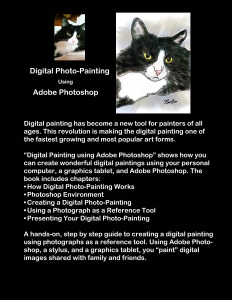
The other night while watching the Washington National’s playoff game (go Nats) and the Capital’s hockey game, I created a draft of the back cover for the book in Adobe Photoshop. Let me know what you think.


If I can complete all the legal tasks in the next couple of weeks, I’ve set a tentative publishing date for November 1. Just in time for holiday sales.


Adobe Photoshop Digital Photo-Painting Book Production Part 2

An interesting item was brought up for discussion from an artist friend who is also a beta reader. Her first comment was about the title of my new book, “Digital Painting with Adobe Photoshop.” She suggested I change the word “with” in the title to “using,” making the title of the book “Digital Photo-Painting using Adobe Photoshop.”

It made me stop and think – Hmm, not a bad idea.

So I’m asking family, friends, fellow writers, artists, beta readers, and anyone else who has an opinion about what you think which title would be better for my book.

KDP as my Publisher

While I’m waiting on my beta readers to provide feedback, I’ve been researching Amazon’s Kindle Direct Publishing (KDP) website for formatting instructions.

Based on everything I’ve read (so far) it sounds like KDP is the best all-around publishers in terms of providing digital and print on demand formats. It also appears KDP has the inside edge in getting your book displayed (and in stock) so people can buy my book. I’ve read more than one account where someone went with another POD publisher an when they submitted their book listed on Amazon. They had problems. One person said after submitting their book to Amazon it took weeks for Amazon to show the book was in stock and available for purchase. Of course, if someone has other ideas, please leave a message in the comments section. I’m still flexible at this point as I do my research.

 Formatting the Book

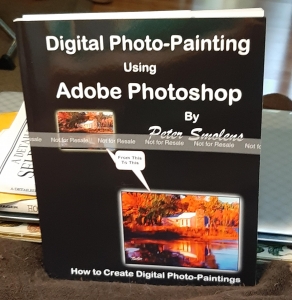
Meanwhile, I’ve been reading about formatting my book for publication. Months ago, I created a cover for the book, as shown below.

 Digital Photo-Painting with Adobe Photoshop book cover

The cover shows a before and after images of a digital photo-painting image. It’s the image I use when creating a digital photo-painting in the book. It’s simple, direct and I think it looks pretty good! What do you think?

Now I’m starting to research how to format the inside text for publication. Wow, I never knew there were so many things to think about when you’re formatting a manuscript for publication. Here is my beginning list of publication decisions I need to make:

  • Single or multiple columns
  • What font to use,
  • Should I justify or not
  • Do I center the illustrations – print screens or left justify.

Keep in mind there are a hundred or so illustrations within this book

I’m sure there are more decisions I need to make about the formatting of my book for publication. As I do more research, I’ll add those options to the list.

According to the first bullet on the KRP instructions is to upload the book in final form. As I learn about KDP standards, some of these items will not be allowed. For example, from early research, it looks like the preferred KDP formatting requirements is a single column of text on the page.

Once the manuscript is in its final form, I need to format to the KDP standards. That is why I’m researching this process now. So I’ll be ready to convert the manuscript into the proper format when I’m ready to upload the book to KDP.


Article Published in Stocks and Commodity Magazine

Wall-Street-Bull-Stock-Market-Graphic-

September 20, 2019 – P.B.S. Studios are proud to announce the publication of a column in the September issue of Stocks and Commodity magazine with the title “Understanding an Annual Report.” The column describes what areas should you pay attention to when reading a company’s annual report. Click on the link to see the article on the Stocks and Commodity magazine.

P.B.S. Studios is a writer/photography/digital painting company that’s written and published over a hundred articles for newspapers, magazines, and online publications. Also, many other photographs were published as illustrations in commercial and textbooks publication. The following is a list of feature articles, photographs, and digital paintings in newspapers and magazines:

Check out the gallery section of my website at www.pbsstudios.com to see this article, photography, and digital photo-painting examples of my work.