
Photo Drawing Sept. 15, 2020
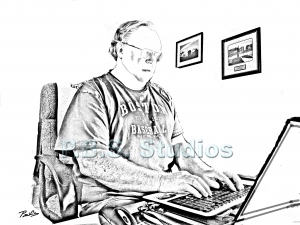
To make it easier for visitors to visit the blog section of my website (www.pbsstsudios.com), I created a new link on the home page. As with my other links on the home page, I need to have an illustration. I decided instead of a digital photo-painting, I would create a drawing from an original photo.
It’s only natural that I use this method since I have been using the outline process as a way to define the image in several of my digital photo-paintings. I’ve always wanted to create a line drawing. Over the years, I have read many articles in photo magazines on turning your photo into drawings. The articles described creating a line-drawing using a freehand method to Adobe Photoshop tools. In my research, I found many different methods. Adobe Photoshop can assist in the process of creating a drawing from a photograph.
My Process for Turning Photo to Drawing
I decided to use a combination of those processes. I started using Adobe Photoshop tools and supplemented the original method with freehand drawing to create this illustration of me at my computer.
Although I like this illustration, using Adobe Photoshop tools to created challenges. I had to spend too much time removing elements because the background in the original image was too confusing. Still, the Photoshop tools did save a lot of time.
I plan on trying this process again to see if I can simplify and improve the process. It might make an excellent series. Once I get the technique down, I’ll write it up and publish the article on my website.
In the meantime, go to the cover page to see the new blog section link.
# # #